TRACK AND MAINTAIN ASSETS ACROSS
MULTIPLE DEPARTMENTS






ASSET MANAGEMENT SOFTWARE
Our adaptable, scalable ShareNet asset and maintenance management system will simplify how you organize and maintain your assets and report on maintenance costs.
You may not realize it as it’s happening, but using old, manual methods of tracking and maintaining your assets can be inefficient and waste money.
Novo Solutions’ asset management software increases efficiency by allowing you to organize your assets and related infrastructure, track their installation or maintenance dates and conditions, and schedule repair jobs, all from one convenient cloud-based system. Experience new possibilities with our Asset Management Platform.
ShareNet Asset Management Software Features
(Click a box to see a screenshot)
Create unlimited, automatic meter, mileage, or time-based tasks that include procedures to set routines, balance workloads, and gain valuable insight.
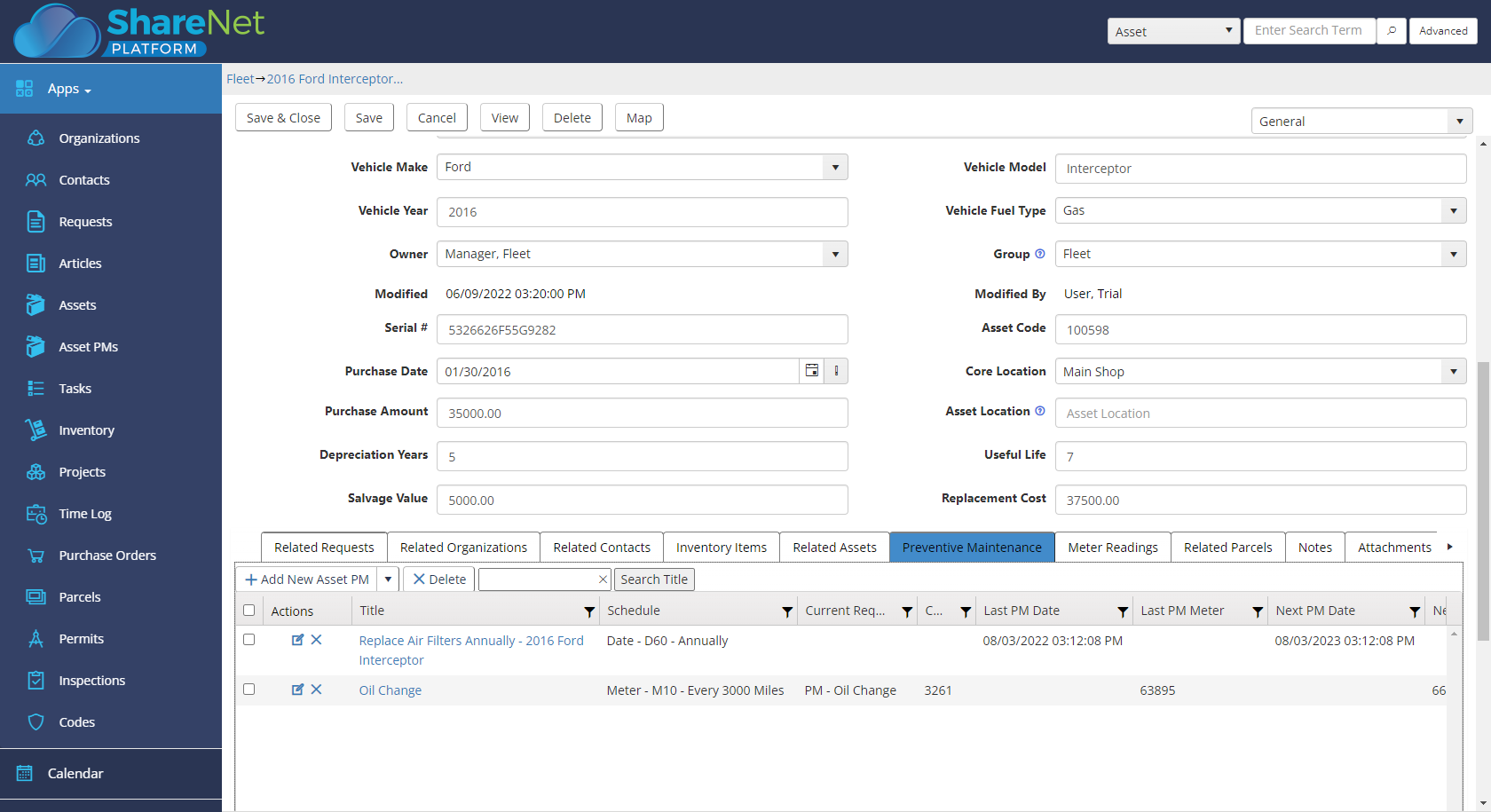
Complete asset visibility, TCO, and ROI with a record of asset health, performance, work orders, inspections, failures, and related documentation.
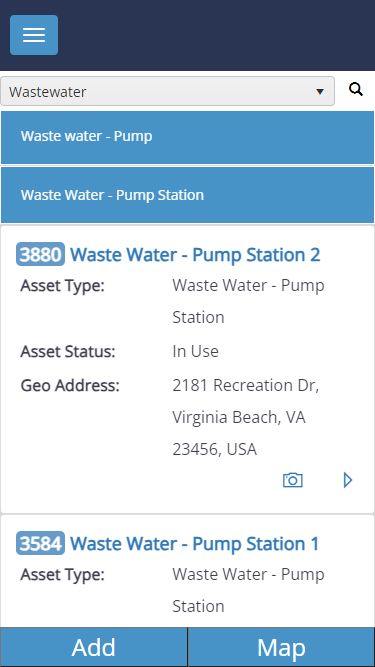
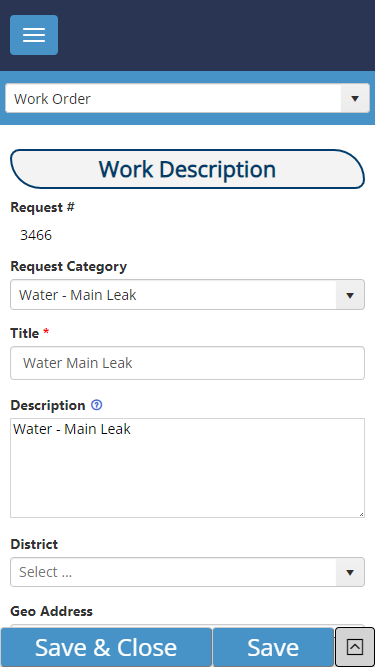
Paperless, streamlined communication and forget wasting time getting back to the office, simply edit, update, and close work orders in the field.
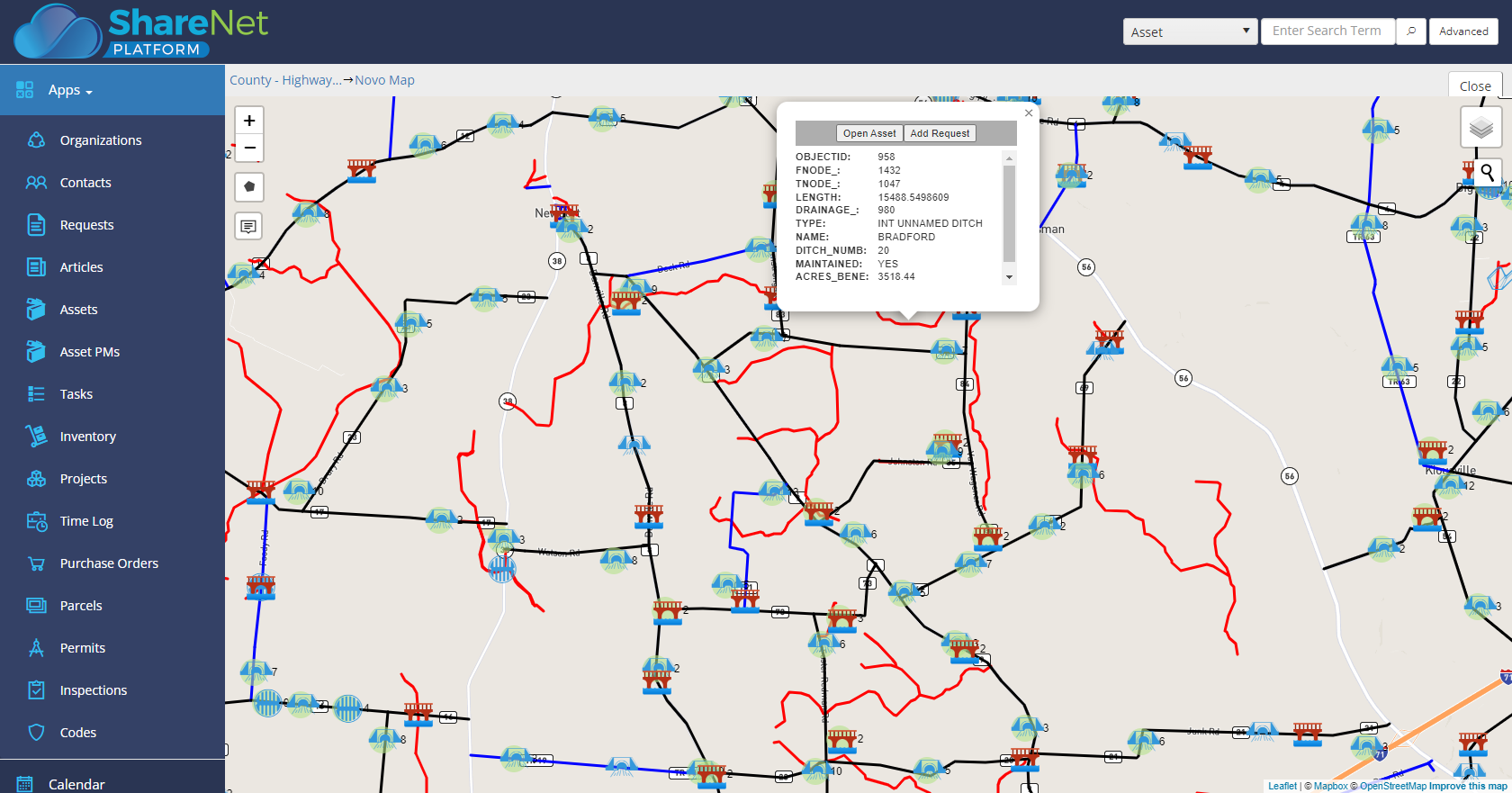
Geotag Assets to display on a map, define asset icons, access Map Layers, integrate with ESRI GIS, and add Assets and related Work Orders from the map.
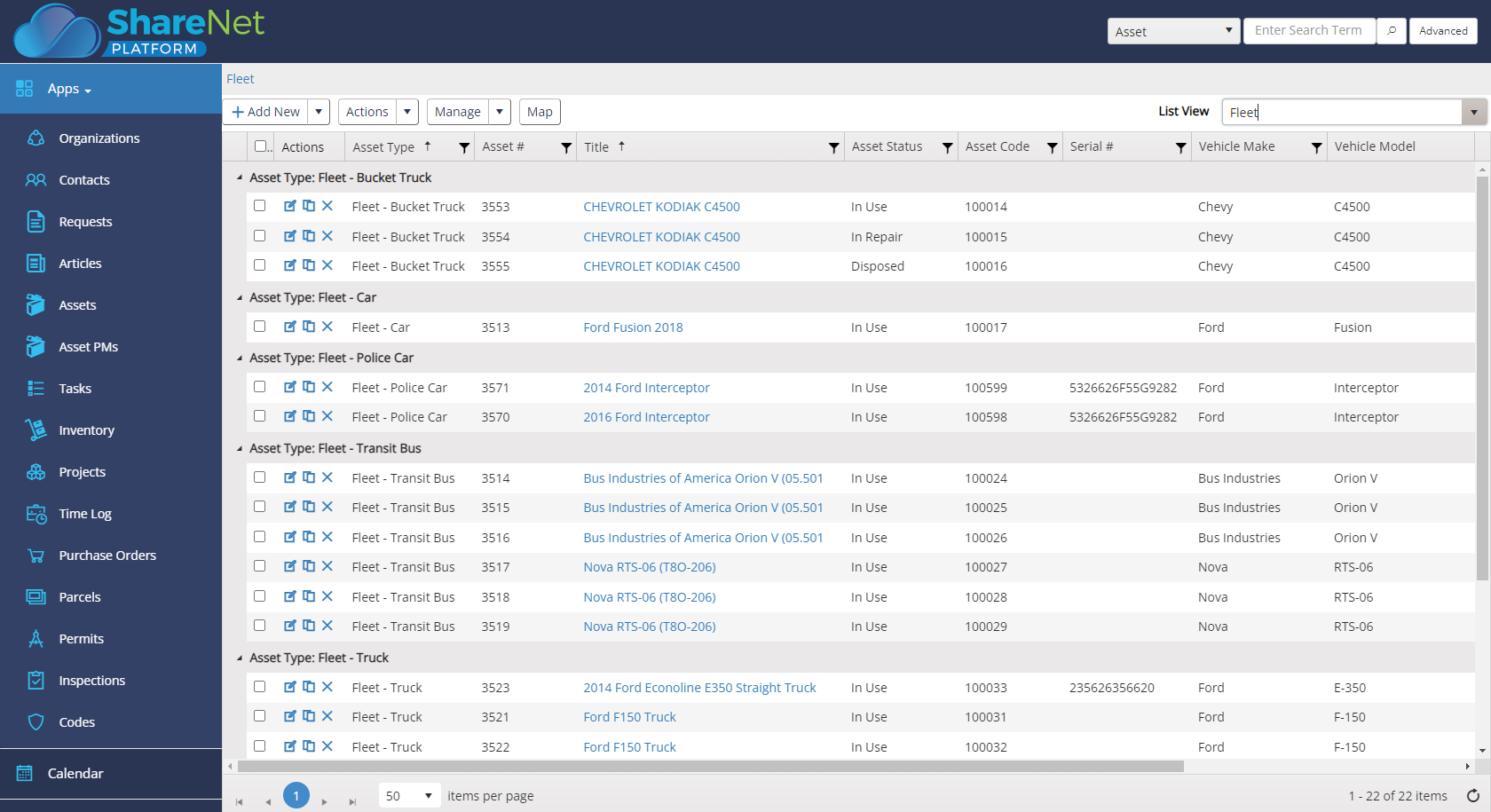
Digitally create, edit, search, map, and track work orders in real-time, gaining operational insight by technician, team, materials, and more.
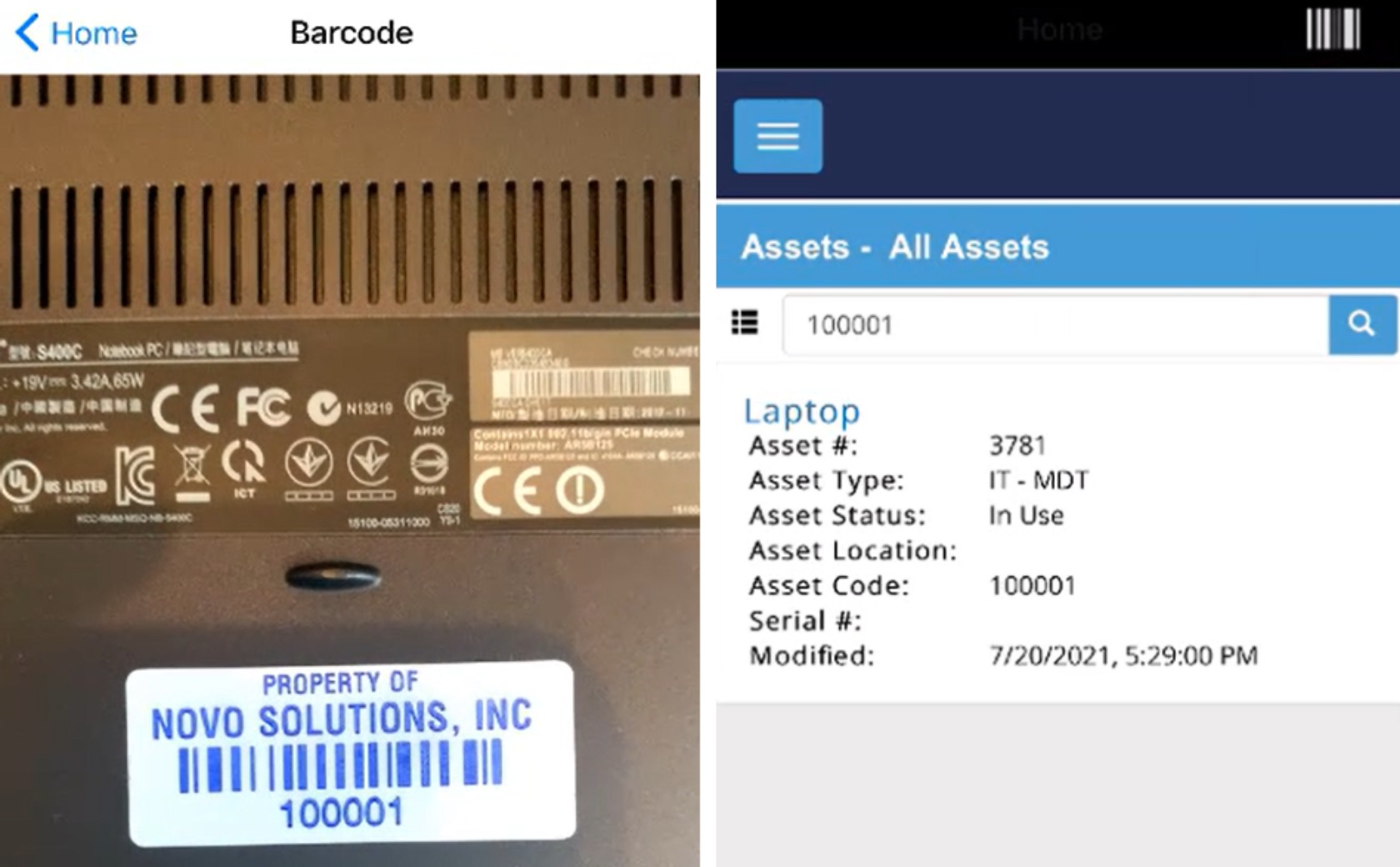
Mobile App with Barcode Scanning of Assets and Parts Inventory. Place Barcode tags on vehicles, lift station pumps, HVAC units and more.
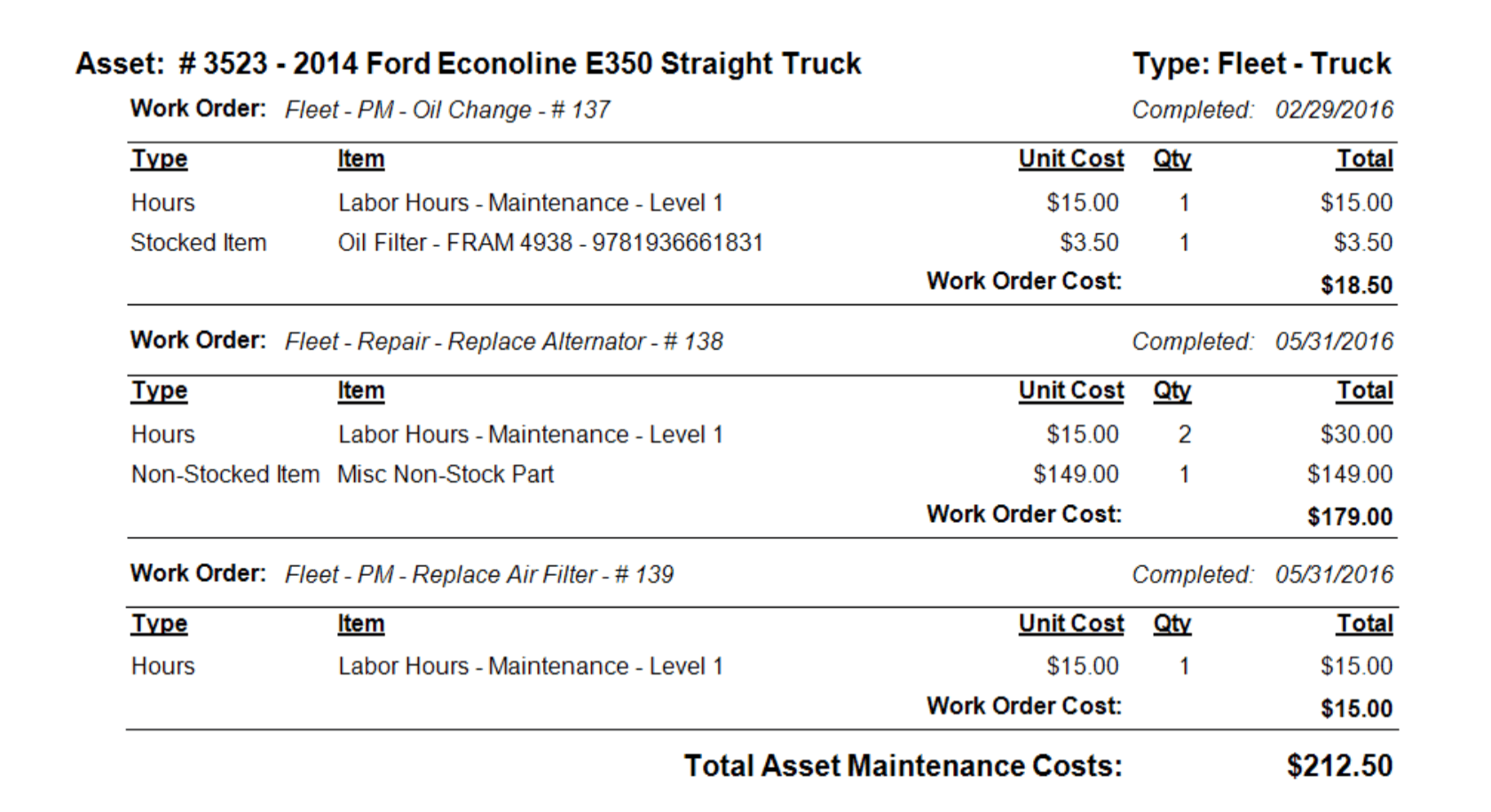
Make decisions on data, by exploring labor, inventory, and maintenance costs and increase negotiation power with the data to back up requests and concerns.
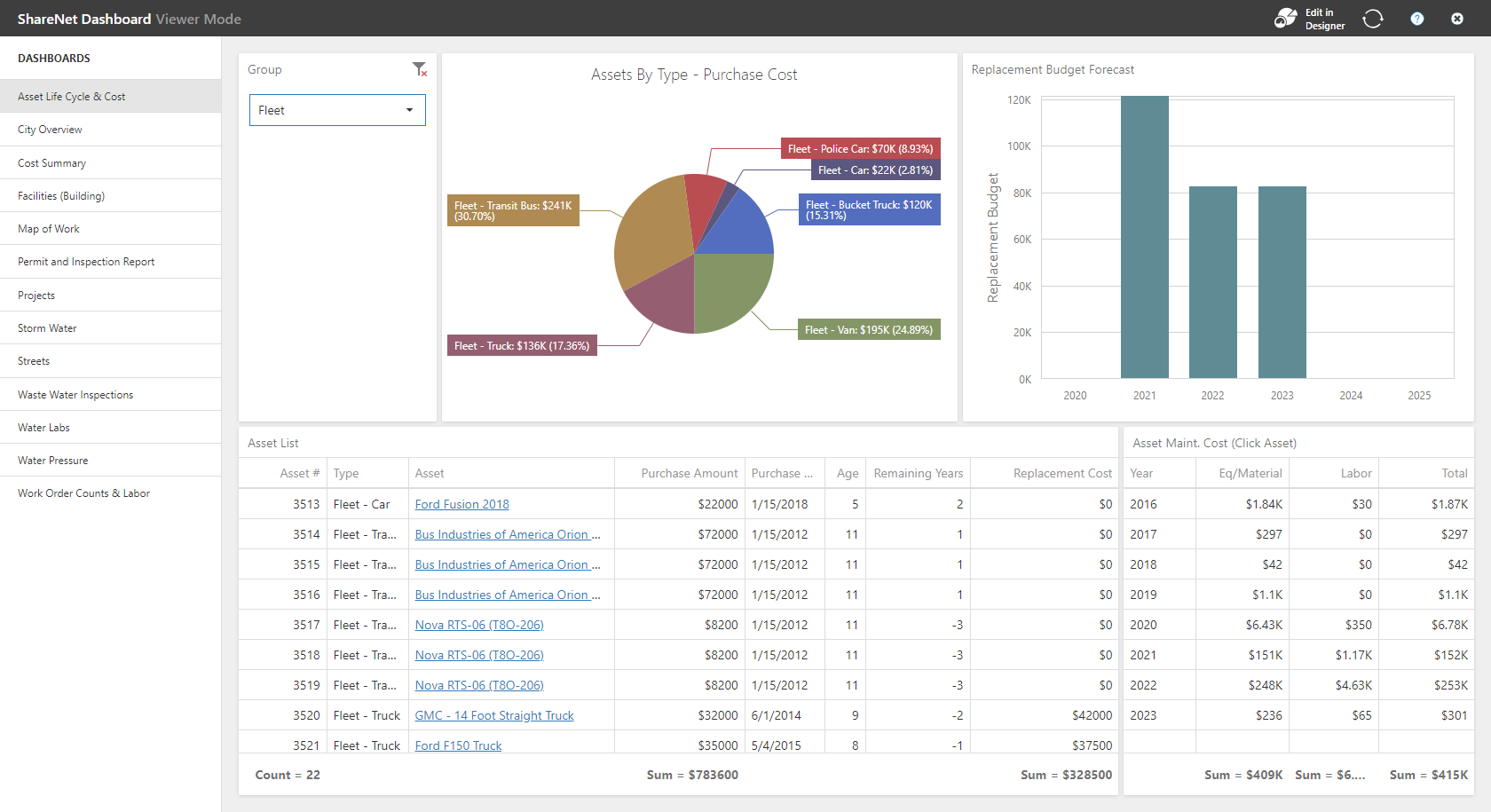
Use information to spot performance trends, monitor labor hours, track productivity, materials, and set company benchmarks for budget meetings.

Organize & Control
Gain control over the organization and status of your assets with Novo Solutions’ ShareNet asset management system.
- Powerful infrastructure asset management can be used from anywhere on any device
- Wide-ranging control across single or multiple locations
- Convenient bar code scanning on smartphones or tablets
- Improve asset visibility by reporting on asset cost, depreciation, downtime, type, location, and more
The Novo Solutions asset management platform will provide the summary and details needed to justify budget decisions. No more ungainly spreadsheets: our turn-key, cloud-based public asset management software lets you easily track, organize, and report asset data on your terms.
Easily Adaptable
Asset Management Software
Create the forms you want, when you want them, without technical support. Choose from 60+ pre-defined fields, or create your own for ultimate usability, scalability, and flexibility.
- Easy-to-use customization wizards, customizable forms, fields, email templates, charts, reports, and more
- Create assets, update assets, and add location information at the office or out in the field
- One system can have multiple permissions for multiple departments
- Highly flexible system architecture can be altered to meet your specific needs and requirements
Our municipal asset management software allows you to easily modify forms, record lists, fields, and email templates, attach documents or photos to your records, and tailor the system to suit your operation.


Asset Utilization
We can help you deploy and utilize assets more efficiently – and never again purchase more equipment than you need. Experience more efficient operations when our public asset management system tracks your assets and equipment.
- Have a detailed record of previous repairs, procedures, and images for all assets on any device, anywhere
- Scheduled asset maintenance is simplified with planned preventative maintenance and automated reminders
- Convenient asset status, completion, and location updates
- Simplified data import, customized reports, and dashboards
Reporting on asset costs is essential to your financial plan and enhances the decision-making process and the available resources that support your long-term goals. Our cloud asset management solution helps you know exactly which assets you have, where they’re located, and what their status is, so that you can get the most out of what you own. Contact us for all things related to your Asset Management Software Solutions.
Maximize Asset Lifespan
Novo Solutions’ ShareNet platform helps you keep track of purchase information, asset maintenance schedules, depreciated value, and more so you can assess and maintain the lifespan and value of those assets.
- Simplified equipment troubleshooting
- Immediate log of all asset changes
- Automated reminders for maintenance, inspections, and warranty expiration
Properly maintained equipment has a longer life and higher retained value. If you can benefit from reducing downtime, increasing equipment life, and improving replace-or-repair decisions, you need our asset management software for public works.


Request a Demo
Asset Management System
If your city, town, or other small to mid-sized municipality or county is wasting time managing its public works operations with outdated systems, then it’s also wasting money it will never get back. There’s a better way to handle this, and Novo Solutions has that answer.
Our web based asset management software lets you organize, track, and maintain your public works assets all from the same platform. Access the platform with a desktop computer, laptop or with mobile devices. View install dates and conditions, schedule maintenance, and set follow-up reminders for yourself. It’s all possible with Novo Solutions.
WHAT OUR CLIENTS SAY
Kim Keesler, Clerk/Treasurer

“Once our Public Works staff had a little practice, they found ShareNet to be very easy to use. Within just three days, they successfully cataloged Fire Hydrants, Water Valves, and Curb Inlets into the system, complete with asset details including geo-location and a picture. This marked a significant improvement over their previous reliance on paper maps, which necessitated return trips to the office. With ShareNet, they can now handle all tasks directly in the field which makes them much more efficient.”
Walt Feurer, Director of Public Works
“ShareNet isn’t limited to just one aspect of our operations; it has become a versatile tool that we rely on for a range of functions. We’ve successfully employed it for managing customer complaints, documenting insurance claims, and tracking bulk water usage. ShareNet’s ability to centralize and organize data has made these processes smoother and more efficient.”

Bryan Hurley, Public Services Foreman

“ShareNet’s Sidekick mobile system has been really handy with the bulk pickup. We’ve saved tremendously on fuel costs, about 1/3 within the first year we’ve used it. It keeps our trucks from running all over town. They can go directly to where the material is, get it out of the citizen’s way, and get it where it needs to be. It’s also better for our drivers, a whole lot less time-consuming. We use it for our bulk pick up of garbage items, leaves and brush, and appliances. By using ShareNet we can keep the materials separate for proper disposal and documented in real-time.”

Stacey Salemi, Crime Analyst/Code Compliance Officer
“The City of Edgewood, FL is looking forward to the long-term benefit of a reduction in capital expenditures as a result of improved building and equipment preventative maintenance.”

Steve Blasko, Public Works Director

“What really stood out is that the team at Novo took the time to talk to us, explaining all you can do when you’re utilizing Share Net. You’re not getting a cookie cutter mobile system when you buy Novo. They’re creating a system tailored to your needs. Their team sat down with every department and built a work order system specifically for them.”

Sandra E., IT Manager/Code Enforcement
“NOVO has been a lifesaver for us with our incident tracking and asset management needs. The tool was easy to implement, and the assistance from the NOVO support staff has made our experience very user friendly.”

Tina Cheek, Director of Parks and Recreation

“Our onboarding process with Novo went great here in Oxford. Several of our departments are using Novo Solutions, and so we’re able to have implementation meetings early on. We had a lot of conversations with the Novo team, got our questions answered quickly, and were given really good information on what the ShareNet product could do. And so far, everything is working exactly like we were told it would. Now we’re just really enjoying the system and know we can reach out to Novo with any questions, at any time.”
Stephanie, Public Works Administrative Assistant
“ShareNet has been instrumental in streamlining our Work Order Management process, ensuring prompt responses and accurate record keeping.”
Dennis Meshaw, Park Maintenance Superintendent for Parks & Recreation

“Before ShareNet, we were using spreadsheets to track all our equipment needs. So, when we had a piece of equipment go to the shop, whether it’s a tractor or a weed-eater, we would track it on a spreadsheet. Now with ShareNet, we’re able to compile all that information in real time and we can just log in and we have all that information available to us. It has streamlined things, and it puts it all in a central location. I can look at it, my director can look at it, and my staff can look at it. So, Share Net’s been great!”
Steven Pilcher, Director of Public Service
“The Novo ShareNet Municipal Software has really helped streamline processes, reduce costs, provide better metrics, and run a more efficient public service department, which in turns creates a better relationship between department staff and the customers served.”
D.J., Sanitation Bulk Pick up – Knuckleboom Crane Operator

“I operate the Knuckleboom machine in Oxford and pick up large debris, brush, furniture, and I use the ShareNet Sidekick App. On the App, I tap what I’m picking up, simply take a snapshot of the debris, and it records it for me. It makes the work so much more efficient and easily documented.”
Gerry Vernon, Public Works Director
“The Public Works Department in the Town of Winter Park, CO needed a way to track calls for service from the public and log maintenance costs for its fleet. After much research, the system by Novo Solutions was selected. I have found the web-based interface very user-friendly, and the customer service provided by Rich Hunter has been exceptional. This solution is perfect to meet the department’s need to become more efficient and effective.”

Andy Elder, Street Foreman

“Our Streets team really likes ShareNet, especially because of its mapping capabilities and that I can see all the work orders on my phone while I’m out in the field. Now if a request comes in, I can take snapshots of the work to be done, work in progress, and finalized work, which all help to show proof of the process. The ability to easily document work, locate assets, and manage preventative maintenance of assets on one system is everything to our department. The ShareNet application has saved us a lot of time. Now we have access to documentation in real time vs. lost on a massive worksheet on the office computer.”
Tiffanie Salone, Public Works Office Coordinator
“The ShareNet platform has been a great addition to our Public Works Department and is an integral part of our daily operations. Most of the Administrative staff and I use the ShareNet Requests application. I use the software to review and respond to external public requests, entering requests received via phone and from office visitors. The new request and editing functions are very user friendly and are highly beneficial in providing better customer service and response time.”